


FaceMagic: AI Videos & Photos
2.11.68K Reviews
App Specs
- Version
- 2.6.12
- Updated On
- License
- Free
- Downloads
- 1,000,000+
- Developer
- AI Creation
- Categories
- Entertainment
- Platform
- Android
Screenshots




 Analysis by AppCompare
I would be cautious about treating a face-swap app as a casual family toy on a shared phone. The fun is easy to understand: you pick a picture or clip, try a transformation, and see whether the result makes everyone laugh. The less obvious part is that the source image may belong to someone else, and a joke can travel beyond the room where it was made. I find FaceMagic works best when the people in the image know what is being created and are happy for it to be shared.
A shared phone needs clear boundaries
If several people use one device, I’d agree on a simple rule before opening the gallery: ask before choosing another person’s photo, and ask again before posting the result. That matters especially when a child borrows an adult’s phone or a parent helps a teen make a clip. A device being shared does not mean every photo on it is fair game, and a funny result can feel different to the person whose face was used.
I’d also keep the first session deliberately small. Choose one image everyone is comfortable using, make one transformation, and review the finished result together before deciding whether it belongs in a group chat or social feed. This is a useful way to see whether the app’s style suits your household without turning a quick experiment into a long scroll through personal photos.
Make creation and sharing separate decisions
One practical distinction is between making something for a laugh on the phone and sending it elsewhere. I would treat those as two separate choices, not as one automatic step. A clip can be entertaining in a private conversation but awkward when it reaches a wider audience, especially if it uses a recognizable face or makes someone appear to say or do something they never did.
For a birthday message or a family group chat, I’d use a photo of the person who is in on the joke, keep the edit obviously playful, and let them see it before it goes out. If the aim is a polished keepsake, a conventional photo editor is usually the safer choice: it gives you more control over the final image and avoids the specific confusion that can come with a face swap.
Who is likely to enjoy it?
FaceMagic is most appealing to people who already enjoy quick visual jokes and are comfortable experimenting with photos and short videos. It can suit friends planning a lighthearted message, a teen making a clearly fictional meme with permission, or a family looking for a brief creative activity together. Its appeal is less about careful editing and more about seeing how a familiar face looks in a different scene.
I would skip it if you need precise editing, a professional-looking result, or a tool for preserving important family memories. It is also a poor fit for anyone who wants to create realistic impersonations of people without their knowledge. In those situations, use a standard editor, a camera app, or a clearly illustrated template that does not put another person’s identity at the center.
Worth Reading Before You Choose

EA SPORTS FC Mobile 26 Is a Bigger Football Game, but It Takes Time

Flipboard Shows What News Apps Must Do Beyond the Feed

Switching to Android Auto Means Rethinking Your Driving Routine

Google Calendar Makes a Crowded Week Easier to Manage

Ludo King Makes the Most of the Minutes Between Plans

Baby Panda World Brings Quick Play to Modern Phones, but Its Game Library Feels Busy
What to check before settling in
The app is free to install, but it offers in-app purchases ranging from $1.99 to $199.99 per item. I’d check the price shown for any item before tapping through, and I wouldn’t assume every template or effect is included in the no-cost experience. If a child is using a shared device, an adult should handle purchase decisions rather than letting an entertaining prompt turn into an unintended expense.
FaceMagic is an entertainment app from AI Creation. It was released on May 18, 2021, and its current version is 2.6.8, with Android 7.0 as the minimum operating system requirement. It has a Teen content rating, so I would not treat that label as a substitute for adult judgment: the right choice still depends on the child, the images they plan to use, and whether they understand how a joke can be shared or misunderstood.
Its audience is sizeable, with over one million installs, but its average rating is 2.0 from around 19,000 ratings, alongside roughly 1,700 written reviews. That contrast is worth taking seriously. I’d try it with modest expectations rather than assuming the polished idea guarantees a smooth or satisfying result every time. Since the app’s value depends on the particular image and effect, I’d judge it by a small test instead of committing to a paid option up front.
How it fits beside familiar alternatives
Compared with a standard photo editor, FaceMagic puts the transformation itself at the center: the pleasure is in seeing a face placed into a new visual context, rather than adjusting color, cropping carefully, or retouching details. Compared with a messaging app’s built-in stickers and filters, it invites a more elaborate result that can become a short clip or GIF. That makes it more playful, but also less predictable and less suitable when accuracy matters.
A useful workflow is to start with a clear, well-lit image where the face is easy to distinguish, then try a single template before building a whole sequence around it. If the result looks odd, I’d change the source photo before blaming the effect; a turned-away face, heavy shadows, or several people in frame can make a transformation harder to read. This small test saves time and helps you decide whether a particular idea is worth sharing.
When a quick experiment becomes a household activity
Imagine a quiet evening when someone wants to make a birthday greeting for a relative. One person chooses a photo the relative has approved, another previews a template, and everyone checks the result before it is sent. That is a better use of the app than passing the phone around without context: it keeps the activity collaborative while giving the person pictured a say in the joke.
For younger users, I’d keep the focus on obviously fictional, friendly edits rather than realistic scenes involving classmates, teachers, or public figures. If a result could be mistaken for a real event, I would not share it. The same judgment applies to adults: a face swap can be technically amusing but socially uncomfortable, so the permission of the person shown matters more than whether the edit is clever.
There is also a practical difference between a shared device and a shared account. If someone else is going to use the phone, I’d stay nearby for the first session and make sure they know which images are appropriate to select and that purchases require an adult’s approval. I wouldn’t assume that a household arrangement creates separate spaces or automatic safeguards; use the device’s own account and purchase settings where needed, and keep expectations simple.
Getting Started with FaceMagic
The first thing I noticed about FaceMagic is how easy it is to get started. You just download the app, and voilà, you’re a few taps away from creating some hilarious and amazing content. The interface is super user-friendly. It’s like the app just gets you, you know?
Once you’re in, you can either choose a photo or video from your gallery, or dive into the app’s vast library of templates. Trust me, their selection is pretty impressive. Whether you’re in the mood for a funny face swap or something more artistic, there’s something here for everyone.
The Magic of AI
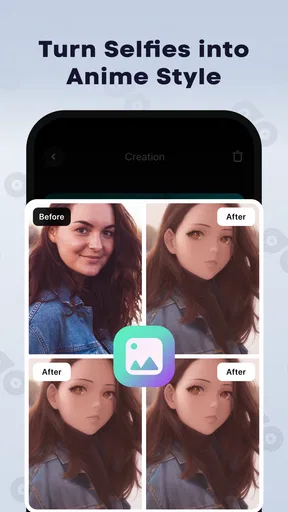
Now, let’s talk about the real star of the show — the AI technology. It’s seriously impressive how this app uses artificial intelligence to seamlessly swap faces or enhance images. The precision is noteworthy, and the results are often downright hilarious. You can place your face on that of a celebrity, or even create a video with your pet’s face on yours! It’s like stepping into a sci-fi movie.
The AI doesn’t just stop at face swapping. You can also experiment with changing your expressions and even aging effects. It’s like having a mini Hollywood studio right in your pocket. The possibilities are endless, and it’s incredibly entertaining to play around with all the different options.
Features Worth Exploring
One of the standout features is the app’s ability to create GIFs and short videos. You can make your creations come to life and share them with your friends. I found myself spending way more time than I’d like to admit, sending these hilarious clips to my friends and family.
Another cool aspect is the app’s regular updates. They’re always adding new templates and effects, keeping things fresh and exciting. Plus, the app’s performance is smooth, with minimal lag, even on older devices.
And for those who love sharing on social media, FaceMagic makes it super easy to post directly to your favorite platforms. You can show off your creativity and get a good laugh out of your followers.
A Few Things to Keep in Mind
While FaceMagic is a blast, it’s worth noting that some of the more advanced features require a subscription. However, the basic features are generous enough to keep you entertained for quite a while. And if you do decide to go pro, the subscription fee is pretty reasonable for the fun you’re getting.
One thing I’d suggest is to keep an eye on your privacy settings. The app does request access to your camera and photos, which is standard, but it’s always wise to be cautious and check what permissions you’re granting.
Final Thoughts
In a world where creativity knows no bounds, FaceMagic: AI Videos & Photos stands out as a fun and innovative app. It’s perfect for those who love to experiment with their photos and videos, bringing a touch of magic to everyday moments. Whether you’re looking to entertain yourself or impress your friends, this app is definitely worth a download. So go ahead, give it a spin, and let your imagination run wild!
My household verdict is that FaceMagic is best treated as a supervised, occasional creativity app rather than an all-purpose photo tool. It can turn a shared moment into a funny clip, but the strongest experience depends on choosing images thoughtfully, setting expectations about spending, and getting consent before sharing. If everyone involved is comfortable with those boundaries, it can be a playful diversion; if not, a regular editor or a simple group photo is the better choice.
Pros
- User-friendly interface for easy navigation.
- High-quality AI-generated photo effects.
- Quick processing time for edits.
- Wide variety of templates available.
- Regular updates enhance features.
Cons
- Requires strong internet connection.
- Some features behind a paywall.
- Occasional AI inaccuracies in photos.
- Limited free template options.
- Potential privacy concerns with data.
FAQs for FaceMagic: AI Videos & Photos
What is FaceMagic: AI Videos & Photos?
FaceMagic is a cutting-edge app that utilizes AI technology to transform your photos and videos. Users can swap faces, create deepfake videos, and explore various filters and effects. It's designed for entertainment and creative expression, offering a wide range of features to enhance your media content.
Is FaceMagic safe to use?
Yes, FaceMagic prioritizes user safety by employing secure data practices. The app requires access to your photos and videos but ensures that your data is not shared without consent. Always make sure to download the app from official sources like Google Play or the App Store to avoid security risks.
How does FaceMagic handle privacy concerns?
FaceMagic is committed to protecting user privacy. The app uses AI to process images and videos locally on your device, minimizing data transfer. Users can review and manage permissions to ensure their content remains private. It’s important to read the privacy policy to understand how your data is handled.
What devices are compatible with FaceMagic?
FaceMagic is available for both Android and iOS devices. It requires a relatively modern smartphone with sufficient processing power to handle AI operations effectively. Always check the app's system requirements on the Google Play or App Store page to ensure compatibility with your device.
Are there any costs associated with using FaceMagic?
FaceMagic offers a free version with basic features, but more advanced functionalities may require in-app purchases or a subscription. This freemium model allows users to explore the app before deciding on a purchase. Check the app’s description for detailed information on pricing and subscriptions.


